Building a contact list using LinkedIn manually is exhausting!
Searching, scrolling, copying details by hand... and before you know it, hours are gone, and your list is still incomplete.
That’s where automation transforms LinkedIn from a time drain into a productivity booster. Automating the process means you’re saving time and creating a precise, accurate, and ready-to-use list right out of the gate.
Key Highlights:
- Scrupp automates LinkedIn data scraping for quick, accurate contact list building.
- Define audience criteria with Sales Navigator’s filters for better outreach.
- Scrupp exports contact details like names, job titles, emails, and company info.
- Organize contact lists by categories to improve outreach and engagement.
- Scrupp verifies data accuracy, reducing bounce rates and improving campaigns.
- Integrate with CRM to track and manage contacts efficiently.
Understanding LinkedIn Scraping
LinkedIn scraping involves extracting data from LinkedIn profiles, such as names, job titles, company information, and contact details.
While this can be done manually, automation tools enhance efficiency and accuracy.
It's important to note that scraping should be conducted ethically and in compliance with LinkedIn's terms of service and data privacy regulations.
Understanding LinkedIn Scraping Tools
LinkedIn scraping tools automate the extraction of data from LinkedIn profiles, including names, job titles, company information, and contact details. While manual data collection is possible, automation tools significantly enhance efficiency and accuracy. However, it's crucial to use these tools ethically and in compliance with LinkedIn's terms of service and data privacy regulations.
Several tools are available for scraping LinkedIn data, each with different features and capabilities. These include dedicated scraping extensions, web-based platforms, and even integrations with CRM systems. Choosing the right tool depends on your specific needs, such as the volume of data you need, the level of automation required, and your budget.
Several tools are available for scraping LinkedIn data, each with different features and capabilities. These include dedicated scraping extensions, web-based platforms, and even integrations with CRM systems. Choosing the right tool depends on your specific needs, such as the volume of data you need, the level of automation required, and your budget.
One popular option is the use of Chrome extensions like LinkedIn Sales Navigator. These tools can automate data extraction from LinkedIn profiles, including names, job titles, company information, and contact details. They are particularly useful for Sales Navigator users.
The tool lets you scrape up to 2,500 profiles in one go and provides verified emails and detailed insights essential for targeted outreach.
Step-by-Step Guide to Building a Reliable Contact List with LinkedIn Scraping Tools
Building a reliable contact list with LinkedIn scraping tools involves a few key steps. Here's a general guide that applies to most tools:
Scrupp makes building a solid contact list on LinkedIn a breeze thanks to its streamlined approach to data scraping.
Let’s see how we can use Scrupp to get the best results from LinkedIn Sales Navigator…
1. Install the Scrupp Extension
First, install the LinkedIn scraping tool of your choice. This typically involves downloading a Chrome extension or signing up for a web-based platform. The setup process varies depending on the tool, but usually involves installing the extension in your browser and connecting it to your LinkedIn account.
The setup is quick; Scrupp will appear as an icon in your browser once installed. Before diving in, make sure you have an active LinkedIn Sales Navigator account.
Scrupp integrates seamlessly with Sales Navigator, making it a must-have for serious prospecting.
2. Define Your Target Audience
One of the best parts about Sales Navigator is its advanced filtering options, which let you pinpoint your ideal prospects. Use filters to narrow down based on industry, job title, location, or even company size.
For instance, if you’re focusing on marketing managers in the tech sector, set up the filters accordingly to zero in on profiles that meet these criteria.
The clearer your audience definition, the better your outreach results will be!
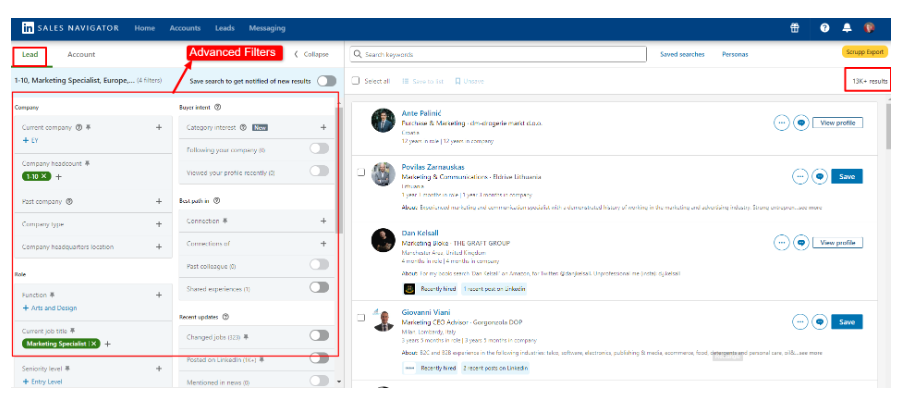
3. Perform a Search on the Sales Navigator
Once your filters are in place, hit the search button to generate a list of contacts who match your criteria.
Take a moment to skim through the results—this quick review helps ensure that the contacts you’re seeing align with your audience.
A little preview here can save time down the line, preventing you from scraping profiles that aren’t relevant.
4. Activate Scrupp to Scrape Data
With your search results on the screen, head back to Scrupp to start the export process.
First, sign up to Scrupp using your Google or email credentials.
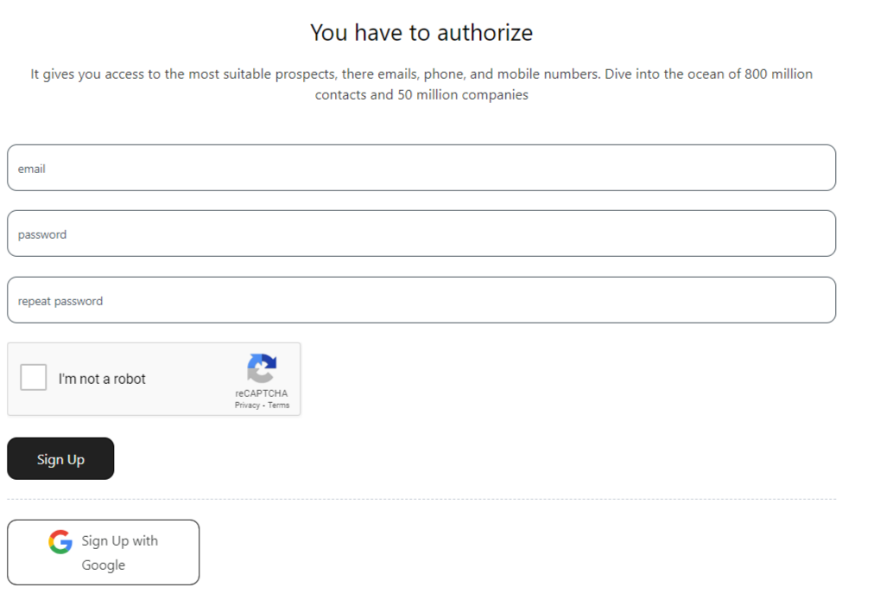
Next, configure the tool to scrape the data you need. This usually involves selecting the profiles you want to extract data from and specifying the data fields you need (e.g., name, job title, email address). Some tools offer advanced features like automated email verification and data enrichment.
Initiate the scraping process. This usually involves clicking a button within the tool to start extracting data from the selected profiles. The tool will then collect the data and prepare it for export.
The tool extracts essential details like names, job titles, company info, and even verified emails when available, giving you everything you need for outreach.
5. Export and Organize the Data
Once the scraping process is complete, export the data to a CSV or Excel file. This allows you to organize and manage your contact information effectively.
This is where organization comes in handy — sorting your data can make future outreach smoother and more effective.
You can categorize contacts by job title, company size, location, or other relevant criteria that suit your needs. A well-organized list lets you tailor your outreach for better results and helps you manage your contacts more efficiently.
6. Verify and Enrich Contact Information
Many scraping tools offer email verification, which ensures that the contact details you collect are accurate and current. This helps to reduce bounce rates and improve overall campaign effectiveness.
Rest assured, your messages will actually reach their recipients, helping to reduce bounce rates and improve overall campaign effectiveness.
7. Integrate with Your CRM
When your contact list is ready, it’s time to put it to good use.
Import the data into your Customer Relationship Management (CRM) system, allowing you to manage and track interactions with each contact.
A CRM helps you stay organized by keeping all your contact information, notes, and follow-up details in one place.
Best Practices for Ethical Scraping
While LinkedIn scraping can be a powerful tool for lead generation and outreach, it's essential to use it responsibly. Here are some ethical practices to follow:
Indeed, scraping can supercharge your outreach – but it’s important to use it responsibly.
Here are some ethical practices for you to follow:
1. Comply with LinkedIn's Terms of Service
LinkedIn's terms of service are designed to protect users and maintain the platform's integrity. Make sure your scraping practices stay within these rules. Avoid excessive data extraction that could overload LinkedIn's servers or violate their policies. Responsible usage helps preserve your account status and LinkedIn's ecosystem.
LinkedIn’s terms of service are designed to protect users and maintain the platform's integrity. So, make sure your scraping practices stay within these rules.
- Avoid excessive data extraction that could
- Responsible usage helps preserve your account status and LinkedIn’s ecosystem
2. Adherence to Data Privacy Regulations
Data privacy laws, like the General Data Protection Regulation (GDPR), have strict guidelines on how personal data should be handled. Respect these laws by using data responsibly and obtaining any necessary consent if required. When dealing with data, treating individuals’ privacy preferences with care is crucial.
Data privacy laws, like the General Data Protection Regulation (GDPR), have strict guidelines on how personal data should be handled. Respect these laws by using data responsibly and obtaining any necessary consent if required.
When dealing with data, treating individuals’ privacy preferences with care is crucial.
3. Responsible Use of Scraped Data
Once you’ve collected data, use it thoughtfully. This means using it solely for legitimate business purposes, like personalized outreach or targeted lead generation. Avoid sharing or selling the data to third parties without authorization — this can breach privacy laws and compromise your credibility. Remember, your goal is to create meaningful business connections – that’s all!
Once you’ve collected data, use it thoughtfully.
This means using it solely for legitimate business purposes, like personalized outreach or targeted lead generation.
Avoid sharing or selling the data to third parties without authorization — this can breach privacy laws and compromise your credibility.
Remember, your goal is to create meaningful business connections – that’s all!
How useful was this post?
Click on a star to rate it.